
Zellij 0.45.0: nested sessions, Kitty graphics, a fresh UI
2026-08-20Zellij 0.45.0 has just been released! Check it out!
Some highlights:
- Nested Sessions
- Kitty Graphics Protocol
- Mobile Web UI
- New UI
- Scrolling by Command
- Per-Client Tab Sizes
- Focus Last Pane and Fullscreen Floating Panes
- Release Notes That Update Your Keybindings
- ADDENDUM: we’re building Zellij.online!
- Please Support the Zellij Developer ❤️
Nested Sessions
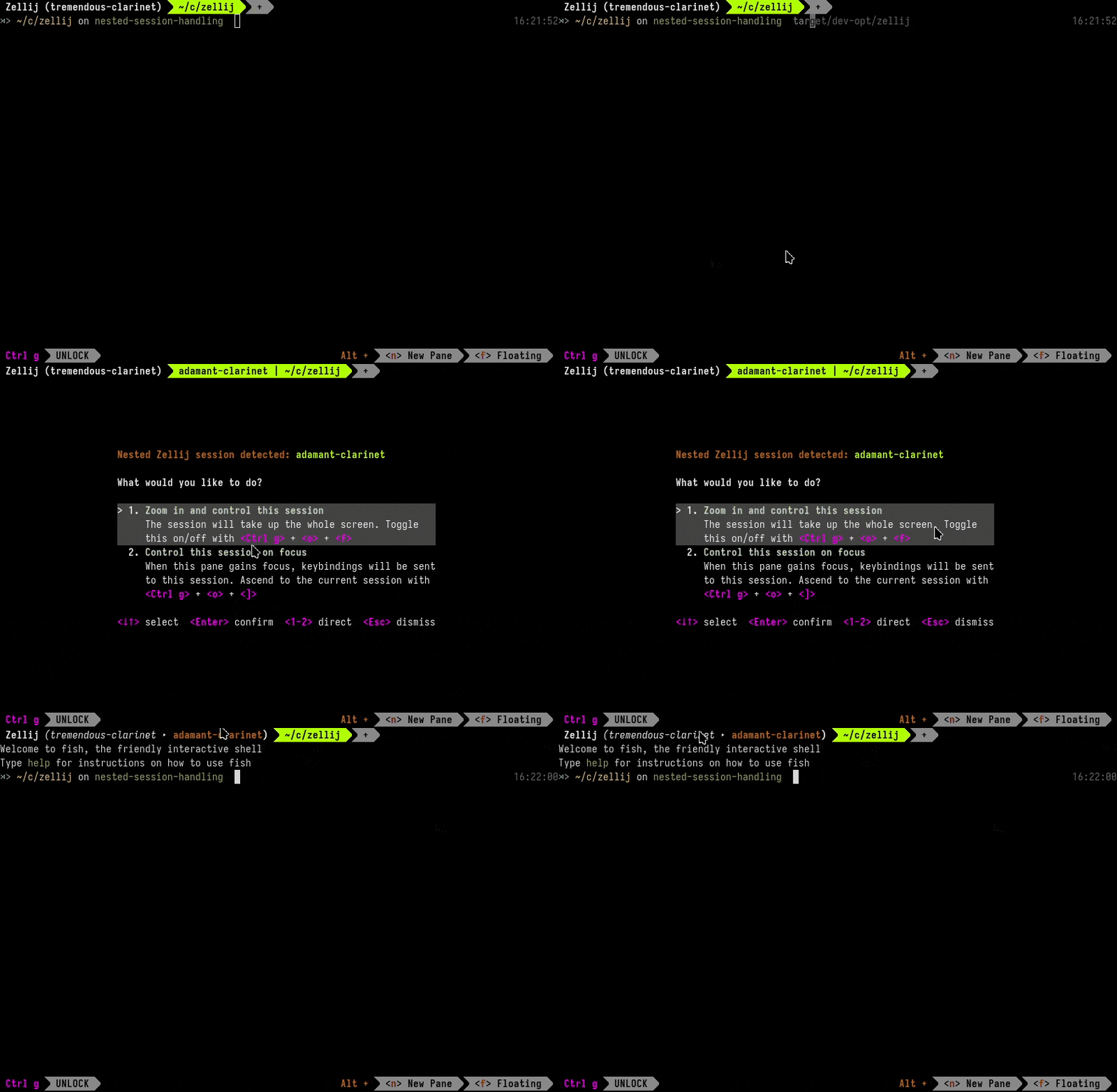
Running Zellij inside Zellij has often been an awkward experience: doubled status bars, keybindings going to the wrong session and a lock mode dance to get anything done. With remote sessions becoming more prominent (eg. when attaching to a remote machine over HTTPS), this happens more and more often.
This release adds dedicated handling of nested sessions. Zellij now detects when it is started inside another Zellij session and offers a choice:
- Zoom in and control the nested session - the nested session takes up the whole screen and can be toggled on and off, essentially becoming your main session until you decide otherwise. Toggling can be done with:
Ctrl o+f(or by clicking the parent session name in the UI breadcrumbs on the tab bar). - Control the nested session on focus - whenever the pane containing the nested session gains focus, keybindings are sent directly to it. You can then ascend back to the outer session with
Ctrl o+], or descend into it again withCtrl o+[.
Kitty Graphics Protocol
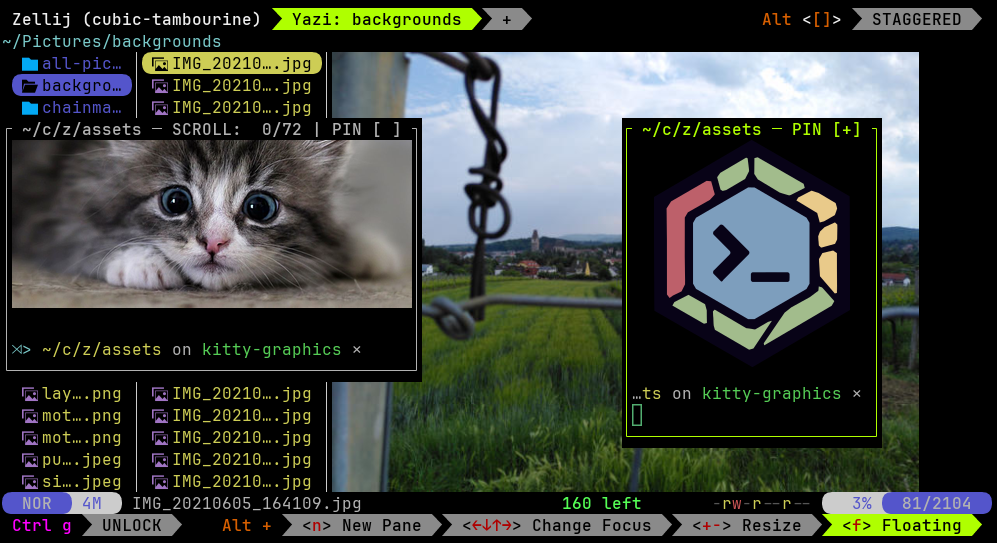
The host terminal needs to support the protocol as well. A personal recommendation for those interested in this feature is WezTerm.
Mobile Web UI
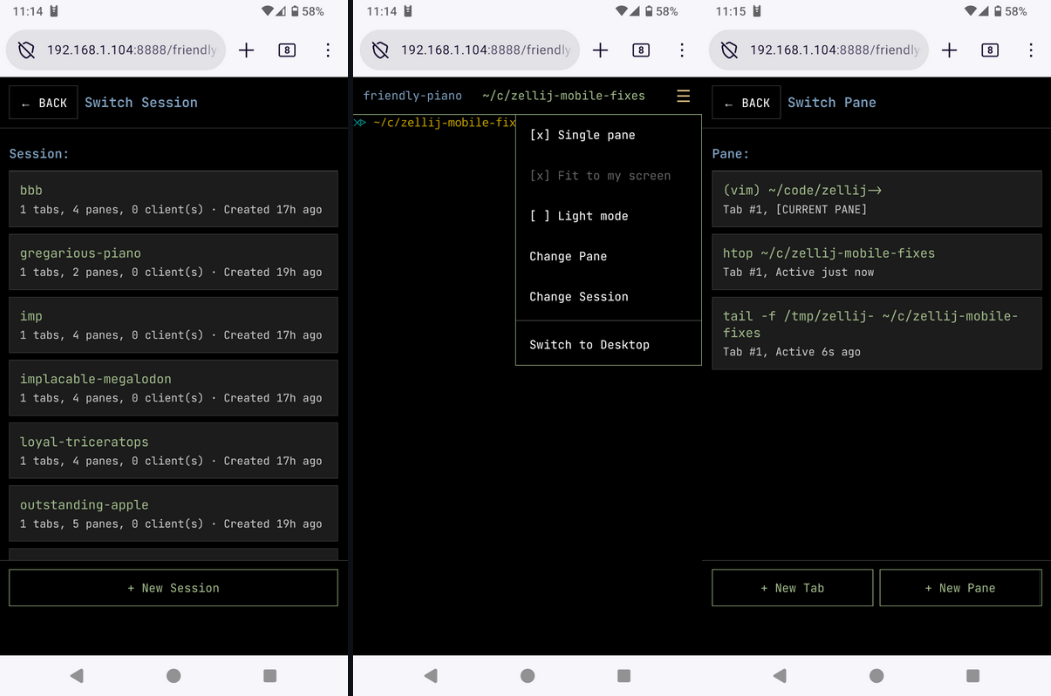
The web client can now also be installed as a standalone app (PWA) directly from the browser - which can be a nice trick to add desktop shortcuts to specific sessions.
Check out the web-client screencast if you’d like to learn more.
New UI
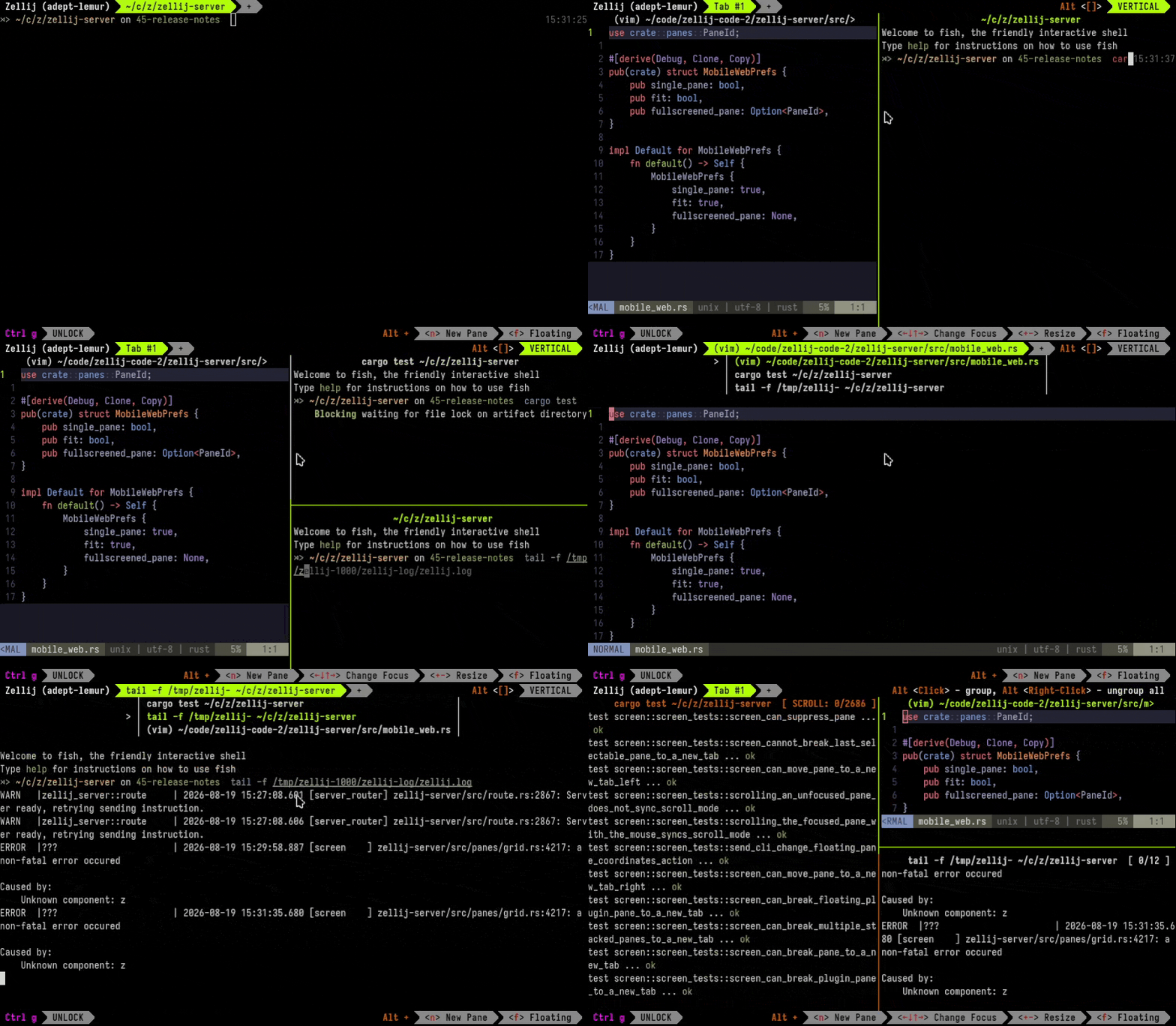
Title frames: pane frames are now off by default, leaving only the title line if there is more than one pane in a tab. For a single pane, the tab’s title will be the pane’s title. The result is a cleaner look and more room for your terminals. If you prefer the classic look, opt out with:
pane_frame_style "full"
Stacked lists: pane stacks have been redesigned to appear as a compact list above the whole stack, allowing the full list of panes to be seen in one place rather than both above and below the expanded pane. To go back to the previous behavior:
stacked_pane_list false
For more info about how to better use stackes, check out the Stacked Resize Screencast/Tutorial
Scrolling by Command
Zellij now allows scrolling by command rather than line by line. This is possible with shells that emit OSC133 to distinguish the command start, end and status.
Some new keybindings to support this:
- Jump between prompts -
Ctrl s+[andCtrl s+]move up and down the scrollback one command at a time, rather than one line or one page at a time. - Select a whole command with its output -
Ctrl s+mselects the command at the current scroll position together with everything it printed. Triple-clicking anywhere inside a command’s output does the same thing. - Copy the output of the last command -
Ctrl s+ccopies what the last command printed straight to the clipboard, with a brief flash showing exactly what was copied.
This is also possible with the mouse scroll: hold <Alt> and scroll with the mouse.
This can be useful when a command spews hundreds of lines and you want the whole thing (and nothing else) in your clipboard to paste elsewhere.
There is nothing to set up on the Zellij side. fish emits these sequences out of the box, while bash and zsh need a shell integration snippet - the same ones distributed for other terminals work here as well.
For more info, see the Shell Integration documentation.
Per-Client Tab Sizes
Tabs can now have different sizes for different clients. When several clients are attached to the same session and are focused on different tabs, each tab is sized to its own client. Previously, all tabs shared the size of the smallest client - meaning one person attaching from a laptop would shrink everyone’s screen. Now tabs are only shrunk when clients are actually focused on the same tab.
Focus Last Pane and Fullscreen Floating Panes
A new action returns focus to the pane that was focused before the current one, so that two panes can be alternated with a single keypress. By default: Ctrl p + ; (or Ctrl g + p + ; for “unlock-first”).
In addition, floating panes can now be made fullscreen, just like tiled panes. The focused floating pane expands over the whole viewport, or over the entire screen when hiding the UI.
Release Notes That Update Your Keybindings
Some of the features above come with new keybindings that will not be present in existing config files. Rather than asking everyone to edit their config by hand, the release notes screen that pops up after an update now detects which of these keybindings are missing and offers to add them to your config file with a single keypress.
We’re building Zellij.online!
For the past few months, some of the maintainers have been working on Zellij.online. An online terminal sharing and streaming service, currently in closed beta. Check it out if you find the idea interesting. You can also read more about its relationship to the Zellij project now and in the future.
Please Support the Zellij Developer ❤️
Zellij is a labor of love and is provided free and open-source to anyone who wishes to use it.
Zellij will never display ads or collect your data.
To help sustain the project, please consider a recurring donation so that the developer can pay their bills: https://github.com/sponsors/imsnif