
Zellij Features - Terminal Superpowers at your Fingertips
Following is a non-exhaustive list of features that make using Zellij a joyful experience.
Floating Panes
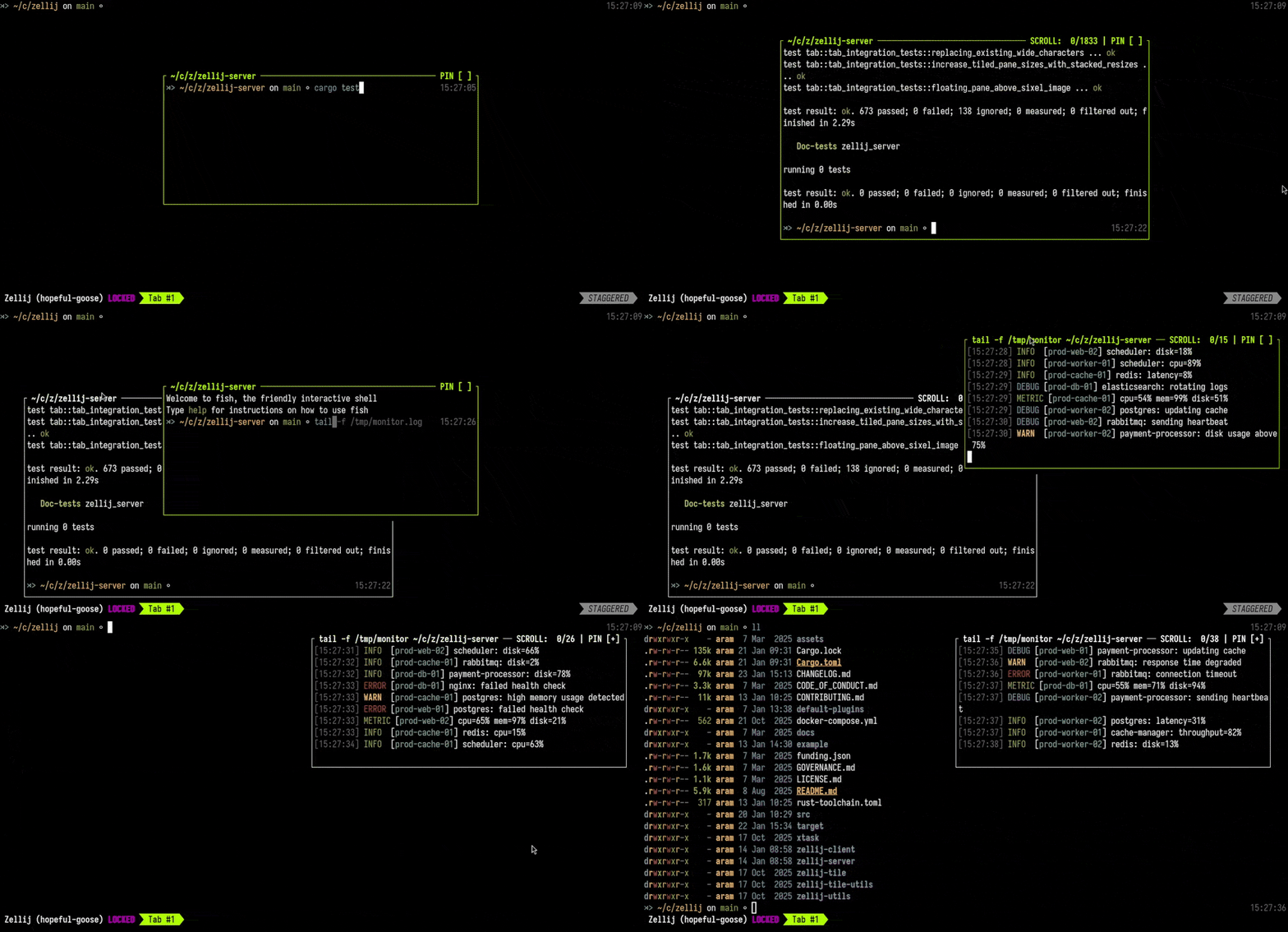
Zellij offers flexible pane management with both tiled and floating layouts:
Floating Panes are first-class citizens in Zellij. They can be toggled on and off with Alt f and are persistent. If you run a command in a floating pane, hide it, and then show it again, the command will still be running in the background. Floating panes can be:
- Moved around with the mouse or keyboard
- Resized
- Rearranged dynamically
- Pinned to stay always-on-top (perfect for monitoring commands while working)
Tiled panes can also be turned into floating panes and vice versa.
Stacked Panes
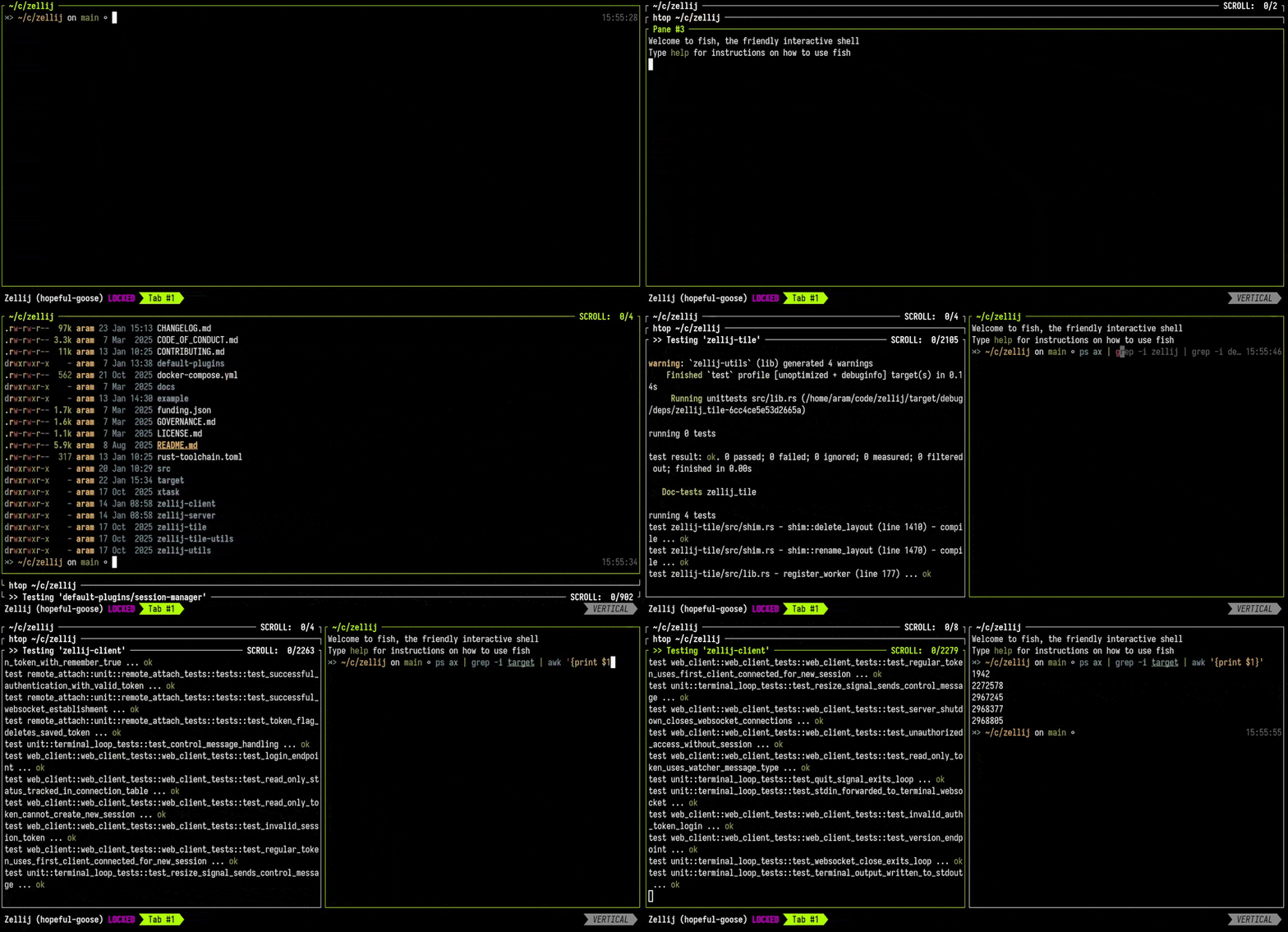
Stacked Panes allow you to layer multiple panes on top of each other. This is perfect for:
- Keeping multiple editor buffers accessible
- Monitoring several commands without taking up horizontal space
- Organizing your workspace by task or context
Navigate between stacked panes with arrow keys and resize them dynamically. Learn more in our stacked resize tutorial.
Layouts & Automation
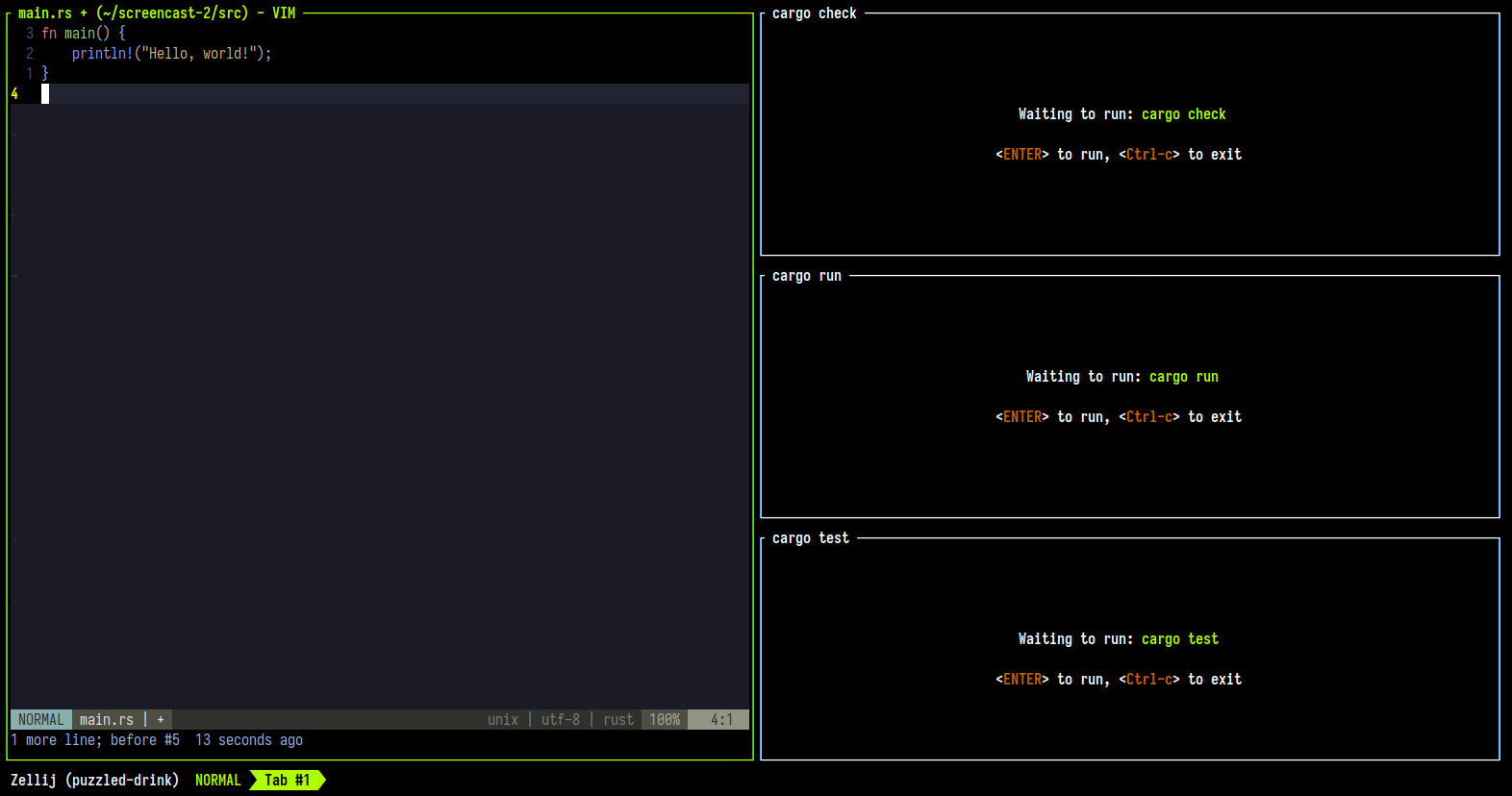
Zellij layouts are powerful automation tools that describe pre-defined sets of panes, tabs, terminals, commands, and plugins. They allow you to:
- Automate Workflows: Define your entire development environment in a single KDL file
- Command Panes: Pre-configure commands that can be re-run with a single key press
- Edit Panes: Automatically open files in your editor when starting a session
- Pane Templates: Avoid repetition by defining reusable pane configurations
- Tab Layouts: Structure multiple tabs with different purposes
Layouts can be version-controlled and shared with your team, making onboarding and context-switching seamless. Check out our comprehensive layouts tutorial to get started.
Session Management
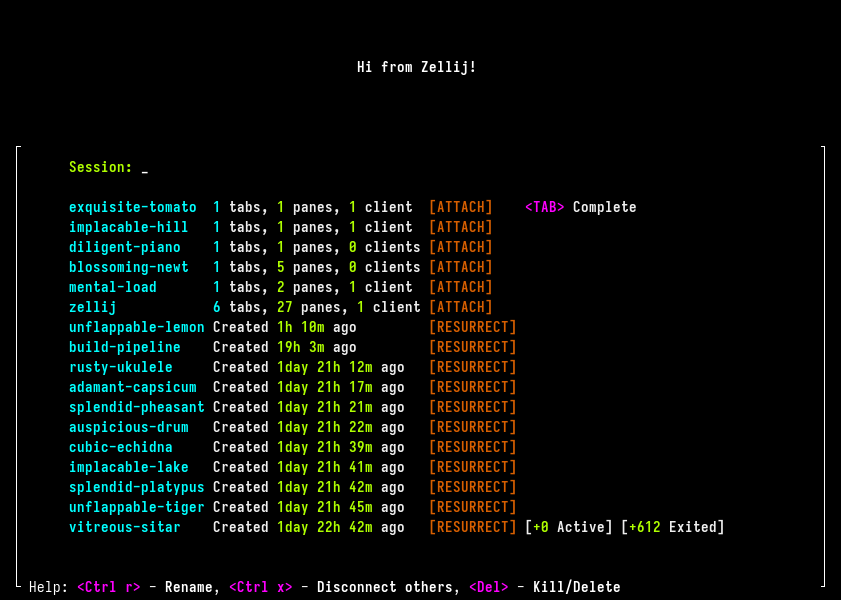
Tired of searching through terminal windows trying to find the right context? Zellij’s session management features solve this problem:
Session Manager (Ctrl o + w) provides:
- Quick switching between running sessions
- Session creation with custom names
- Background session management
- Context preservation when switching
Welcome Screen (launch with zellij -l welcome) offers:
- “Start Menu” for your terminal
- Visual session selection interface
- Create or attach to sessions on startup
- Resurrect exited sessions with full context
Session Resurrection is a unique feature that allows you to bring back closed sessions with their full pane structure and commands, even across reboots. This is invaluable when you need to return to a previous complex task or context.
Learn how to integrate session management into your workflow in our session management tutorial.
Web Client
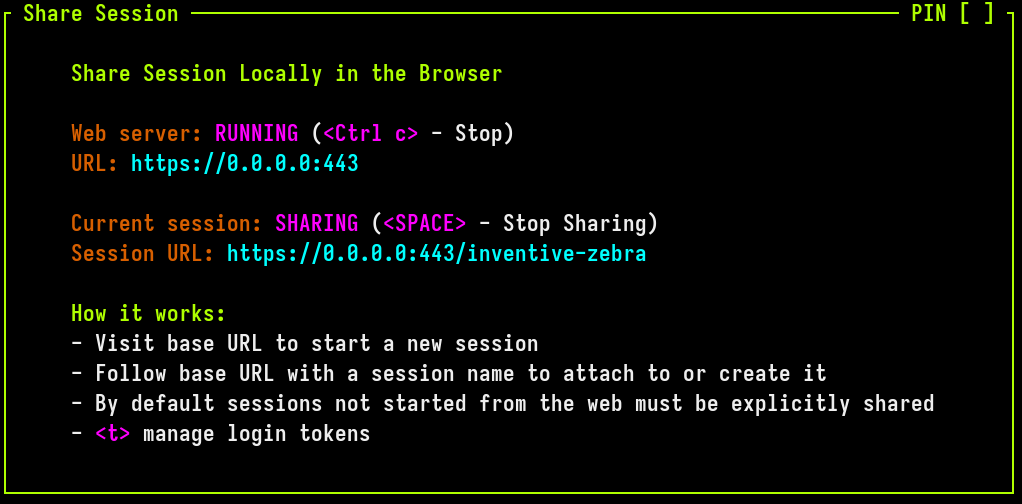
Zellij includes a built-in web server that serves sessions directly in your browser:
Key Features:
- No Terminal Required: Access your Zellij sessions from any web browser
- Built-in authentication: Control access to your terminal
- Persistent Sessions: Bookmark specific sessions via URL (e.g.,
http://localhost:8082/my-project) - Seamless Switching: Switch between terminal and browser without interruption
- Share Sessions: Perfect for pair programming, debugging with teammates, or accessing your terminal remotely
The web client makes the terminal emulator optional, not required. Set it up locally or share sessions with your team. See our web client tutorial for setup instructions.
Plugin System
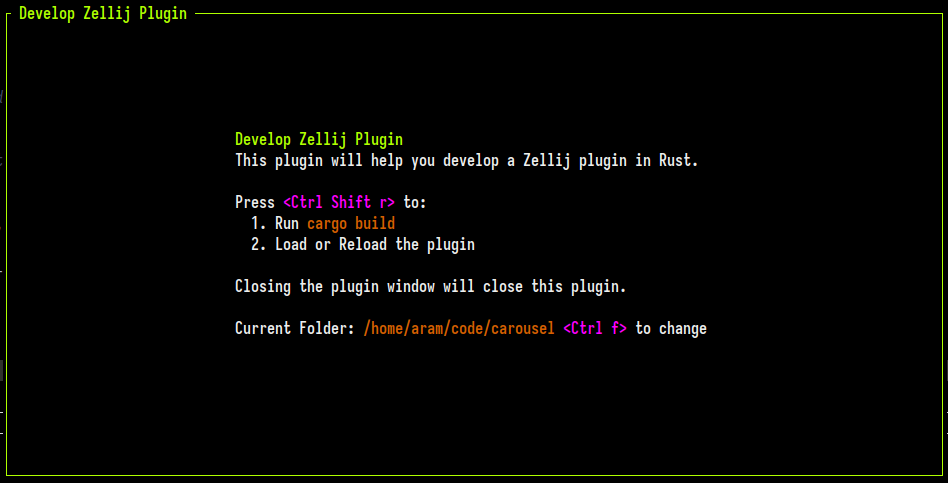
Zellij’s plugin system allows you to extend functionality using WebAssembly:
The Zellij interface is made up of plugins:
- Tab Bar & Status Bar: Customizable UI components
- Session Manager: Visual session management interface
- Welcome Screen: Session launcher and manager
- Multiple Pane Select: Bulk operations on multiple panes
- Configuration Screen: Interactive configuration management
- Strider (Filepicker): Dynamic filesystem navigation with fuzzy finding
Develop Your Own:
- Write plugins in any language that compiles to WebAssembly
- Rust has first-class support with dedicated SDK
- Access to Zellij state and events
- Can render custom UIs and respond to user input
- Distribute as a single .wasm file that does not require installation
Zellij provides scaffolding tools to get started quickly. Follow our Rust plugin development tutorial to build your first plugin.
Command Panes
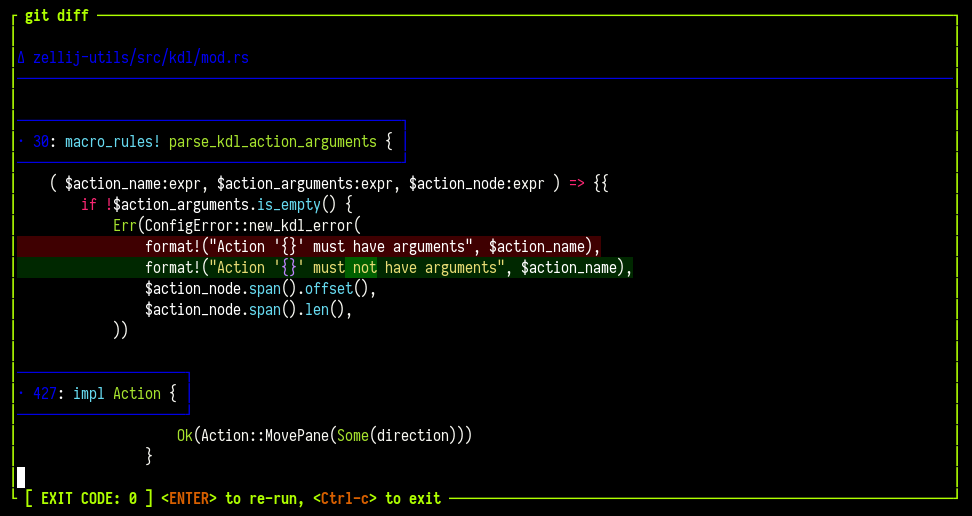
Command panes are a unique Zellij feature that treats commands as first-class pane citizens rather than just terminal output:
Benefits:
- See the exit code of completed commands
- Re-run commands with a single
Enterkey press - Start commands suspended and run them on-demand
- Keep frequently-used commands accessible in your layout
- Perfect for build commands, tests, and development servers
Command panes can be included in layouts with the start_suspended option, allowing you to define commands that wait for you to manually trigger them. This is ideal for resource-intensive operations you don’t want running immediately on startup.
Scrollback Editing
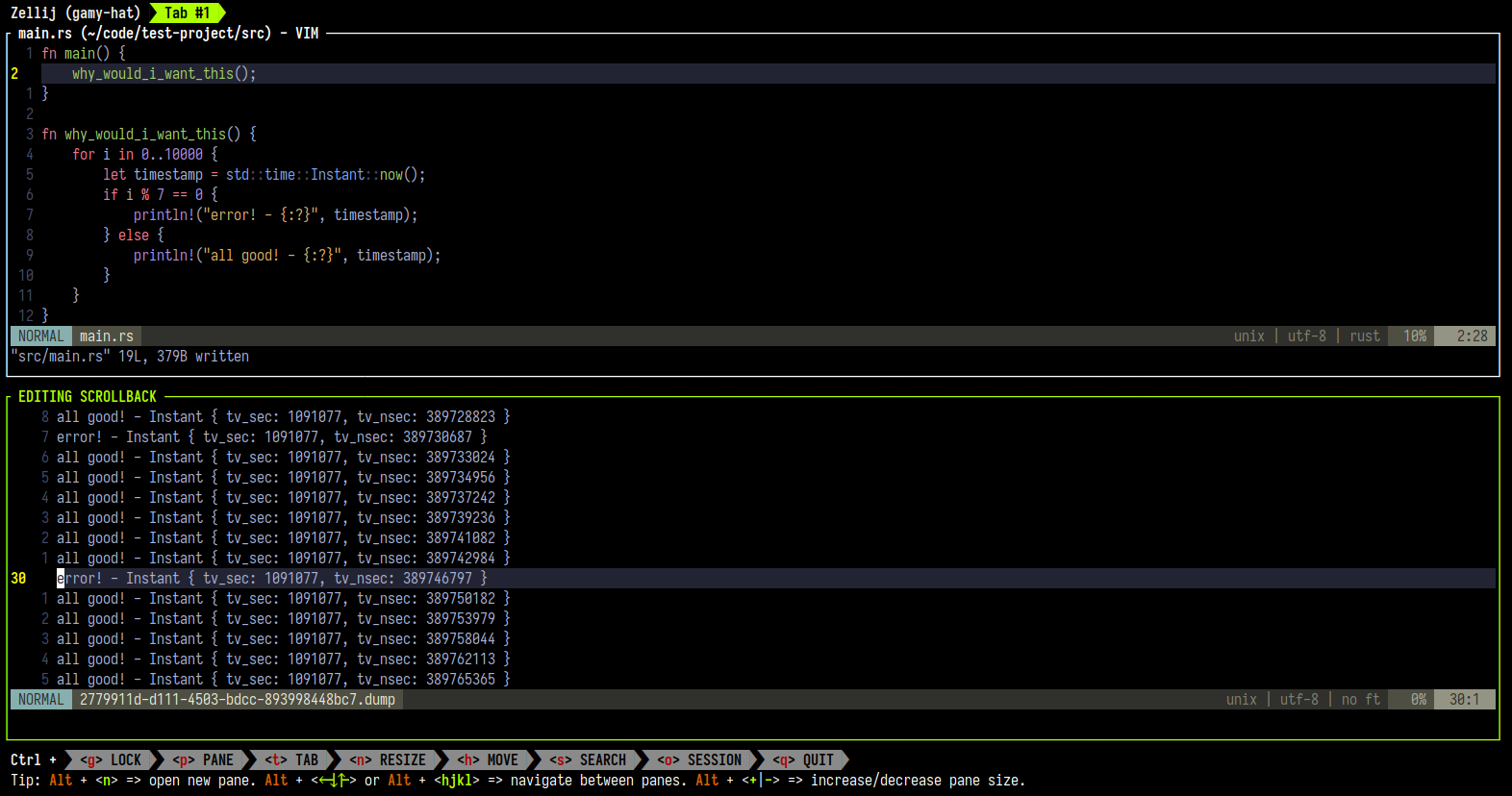
Zellij allows you to open any pane’s scrollback buffer directly in your $EDITOR:
- Press
Ctrl s+eto edit the current pane’s scrollback - Use your favorite editor (vim, emacs, neovim, etc.)
- Save output to files for sharing or documentation
- Search, manipulate, and copy terminal output with full editor capabilities
This feature transforms terminal output from ephemeral text into something you can work with using your full editor toolkit.
Remote Session Access
Zellij sessions can be accessed remotely over HTTPS, both through a web browser and from another terminal:
- Browser Access: Connect to sessions through the built-in web client
- Terminal Attach: Attach to a remote session from another terminal with
zellij attach https://my-server:8082/my-session - Read-Only Sharing: Create read-only tokens for observers who can view but not interact with the session
This makes pair programming, remote debugging, and terminal sharing seamless - no SSH tunnels or third-party tools required.
Advanced Scriptability
Zellij exposes its full control surface through CLI commands, making it possible to build sophisticated terminal workflows from shell scripts or external tools:
- Conditionally blocking panes: Open a pane that blocks the calling script until the command succeeds (
--block-until-exit-success), fails (--block-until-exit-failure), or simply finishes (--block-until-exit). Failed commands can be retried interactively without the script losing its place. - Live pane output streaming:
zellij subscribestreams the rendered output of any pane to stdout in real time, with optional JSON formatting for structured processing. - Structured state queries:
list-panes --json,list-tabs --json, andcurrent-tab-info --jsonreturn full session state as JSON, enabling scripts to discover panes, check exit statuses, and make decisions based on session state. - Background sessions: Create headless sessions with
zellij attach --create-background, then control them entirely from external scripts - opening panes, sending input, reading output, and tearing down when done. - ID capture: Pane and tab creation commands return the created resource’s ID on stdout, enabling scripts to target specific panes by ID for subsequent operations.
These primitives compose naturally. For example, a CI-like pipeline that retries failed steps with human intervention:
# Each step blocks until it succeeds - the user can retry failures interactively
zellij action new-pane --block-until-exit-success --name "tests" -- make test
zellij action new-pane --block-until-exit-success --name "build" -- make build
zellij action new-pane --block-until-exit --name "deploy" -- ./deploy.sh
For full details, see Programmatic Control, CLI Recipes, and Zellij Subscribe.
Multiple Pane Select
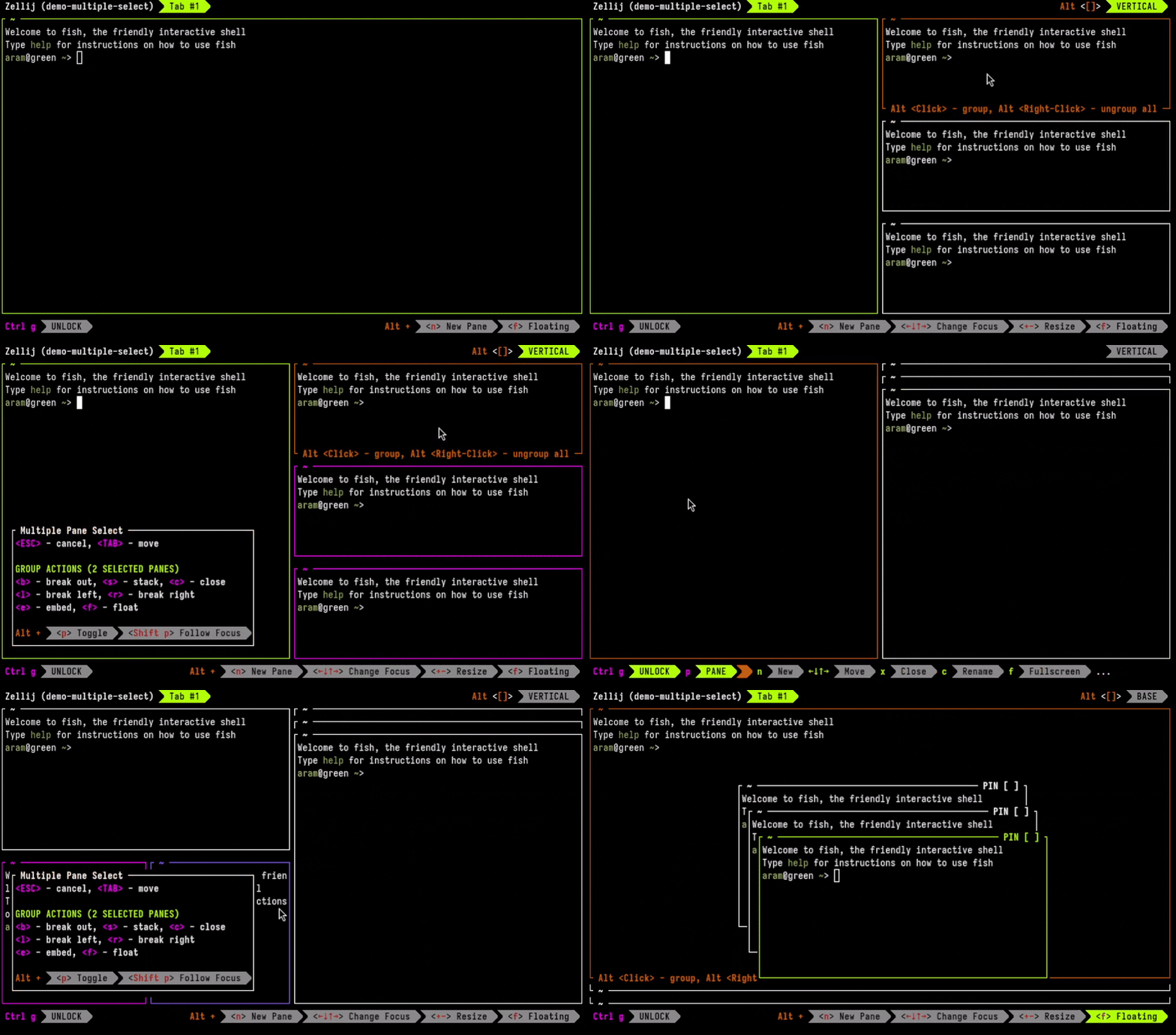
Perform bulk operations on multiple panes at once:
- Select panes with
Alt+left-click(hold and drag to select multiple) - Close multiple panes at once
- Break panes to new tabs in bulk
- Stack selected panes together
- Move focus through selected panes
The multiple pane select dialog appears automatically when panes are selected, showing available actions. This is perfect for reorganizing your workspace or cleaning up many panes quickly.
Mouse-Based Pane Resizing
Zellij supports intuitive mouse-based pane resizing:
- Drag Tiled Pane Borders: Click and drag the border between tiled panes to resize them
- Ctrl+Drag Floating Pane Borders: Hold Ctrl and drag the border of a floating pane to resize it
- Ctrl+ScrollWheel: Hold Ctrl and scroll the mouse wheel up or down to resize the focused pane
These interactions complement the keyboard-based resize mode, providing a natural way to adjust pane sizes.
Click-to-Open File Paths
Zellij detects file paths appearing in terminal output and makes them clickable. Clicking a path opens it in your $EDITOR in a new floating pane. For example:
- Click a file path in compiler errors to jump straight to the source
- Click
src/main.rs:42in log output to open the file at line 42 - Click a directory path to browse it in the built-in filepicker
Native Windows Support
Zellij runs natively on Windows. Windows binaries are available on the releases page.
Getting Started
Ready to try these features?
- Try Zellij without installing
- Watch screencasts and tutorials to see features in action
- Read the documentation for comprehensive guides
- Check out the roadmap to see what’s coming next
Zellij will always be free and open-source. If you find it valuable, consider supporting development.