Zellij Run & Edit
- Zellij Run - Launch a command in a new pane with options for floating, blocking, and more
- Zellij Edit - Open a file in your default editor in a new pane
Zellij Run
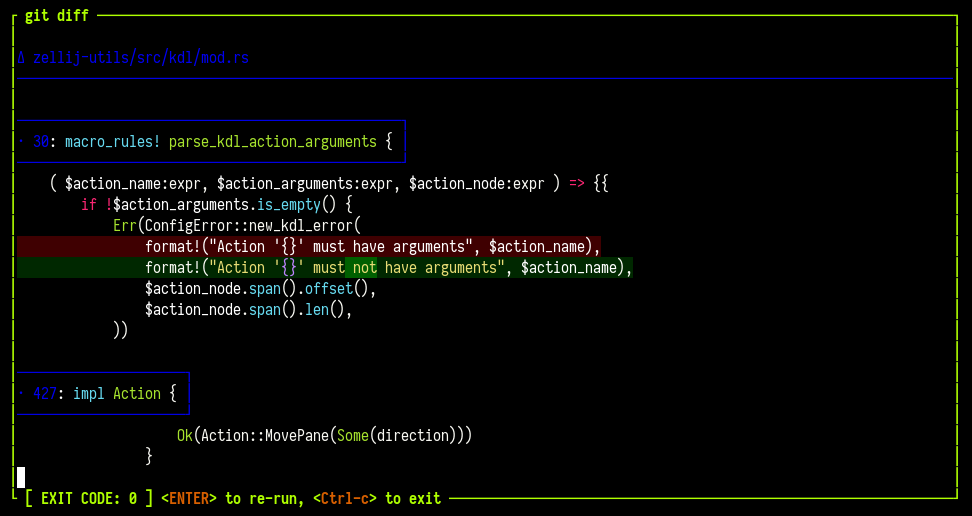
Zellij includes a top-level run command that can be used to launch a new Zellij pane running a specific command:
eg.
$ zellij run -- git diff
OPTIONS:
-b, --borderless <BORDERLESS>     start this pane without a border (warning: will make it
                                  impossible to move with the mouse) [possible values: true,
                                  false]
    --block-until-exit            Block until the command exits (regardless of exit status) OR
                                  its pane has been closed
    --block-until-exit-failure    Block until the command exits with failure (non-zero exit
                                  status) OR its pane has been closed
    --block-until-exit-success    Block until the command exits successfully (exit status 0) OR
                                  its pane has been closed
    --blocking                    Block until the command has finished and its pane has been
                                  closed
-c, --close-on-exit               Close the pane immediately when its command exits
    --close-replaced-pane         Close the replaced pane instead of suspending it (only
                                  effective with --in-place)
    --cwd <CWD>                   Change the working directory of the new pane
-d, --direction <DIRECTION>       Direction to open the new pane in
-f, --floating                    Open the new pane in floating mode
-h, --help                        Print help information
    --height <HEIGHT>             The height if the pane is floating as a bare integer (eg. 1)
                                  or percent (eg. 10%)
-i, --in-place                    Open the new pane in place of the current pane, temporarily
                                  suspending it
-n, --name <NAME>                 Name of the new pane
    --near-current-pane           if set, will open the pane near the current one rather than
                                  following the user's focus
    --no-focus                    Open the pane without changing the focus of any client
    --pinned <PINNED>             Whether to pin a floating pane so that it is always on top
-s, --start-suspended             Start the command suspended, only running after you first
                                  presses ENTER
    --stacked
    --tab-id <TAB_ID>             Open the pane in the tab with this id (conflicts with
                                  --in-place and --near-current-pane)
    --width <WIDTH>               The width if the pane is floating as a bare integer (eg. 1) or
                                  percent (eg. 10%)
-x, --x <X>                       The x coordinates if the pane is floating as a bare integer
                                  (eg. 1) or percent (eg. 10%)
-y, --y <Y>                       The y coordinates if the pane is floating as a bare integer
                                  (eg. 1) or percent (eg. 10%)
Note: to shorten this command to a more friendly length, see Completions under: CLI
About --no-focus: the pane is opened without changing the focus of any connected client. Its placement is relative to the pane the command was issued from rather than to the focused pane. This is useful for scripts that open panes in the background.
About --tab-id: the pane is opened in the tab with the given (numeric) id rather than in the focused tab. Tab ids can be obtained with zellij action list-tabs or zellij action query-tab-names.
This new pane will not immediately close when the command exits. Instead, it will show its exit status on the pane frame and allow users to press <ENTER> to re-run the command inside the same pane, or <Ctrl-c> to close the pane.
We feel this is a new and powerful way to interact with the command line.
Zellij Edit
It's possible to open your default editor pointed at a file in a new Zellij pane.
This can be useful to save time instead of opening a new pane and starting your default editor inside it manually.
eg.
$ zellij edit ./main.rs # open main.rs in a new pane
$ zellij edit --floating ./main.rs # open main.rs in a new floating pane
$ zellij edit ./main.rs --line-number 10 # open main.rs pointed at line number 10
Possible Options:
-b, --borderless <BORDERLESS>      start this pane without a border (warning: will make it
                                   impossible to move with the mouse) [possible values: true,
                                   false]
    --close-replaced-pane          Close the replaced pane instead of suspending it (only
                                   effective with --in-place)
    --cwd <CWD>                    Change the working directory of the editor
-d, --direction <DIRECTION>        Direction to open the new pane in
-f, --floating                     Open the new pane in floating mode
-h, --help                         Print help information
    --height <HEIGHT>              The height if the pane is floating as a bare integer (eg. 1)
                                   or percent (eg. 10%)
-i, --in-place                     Open the new pane in place of the current pane, temporarily
                                   suspending it
-l, --line-number <LINE_NUMBER>    Open the file in the specified line number
    --near-current-pane            if set, will open the pane near the current one rather than
                                   following the user's focus
    --no-focus                     Open the pane without changing the focus of any client
    --pinned <PINNED>              Whether to pin a floating pane so that it is always on top
    --tab-id <TAB_ID>              Open the pane in the tab with this id (conflicts with
                                   --in-place and --near-current-pane)
    --width <WIDTH>                The width if the pane is floating as a bare integer (eg. 1)
                                   or percent (eg. 10%)
-x, --x <X>                        The x coordinates if the pane is floating as a bare integer
                                   (eg. 1) or percent (eg. 10%)
-y, --y <Y>                        The y coordinates if the pane is floating as a bare integer
                                   (eg. 1) or percent (eg. 10%)
Note: The default editor is anything set in $EDITOR or $VISUAL - alternatively, it can be set explicitly with the scrollback_editor configuration option.
Another Note: To shorten this command, see Cli Completions