
Simple and powerful. A terminal and multiplexer you learn in minutes and keep for years.
bash <(curl -L https://zellij.dev/launch)bash <(curl -L https://zellij.dev/launch)irm https://zellij.dev/launch.ps1 | iex$ npm run dev > photo-sorter@0.3.0 dev✓ ready on http://localhost:3000GET / 200 11msGET /photos 200 22msGET /photos?page=2 200 21msGET /api/albums 200 8msGET /photos/41 200 15msGET / 200 23msGET /api/albums/3 200 19msGET /photos?page=3 200 24msGET /favicon.ico 200 22msGET /photos/58 200 6msGET /api/me 200 23msGET /photos?page=4 200 4msGET / 200 30msGET /photos/77 200 19msGET /api/albums 200 12msGET /photos?page=5 200 21msGET /photos/80 200 11msGET /api/me 200 10ms
^C$ npm run buildvite v5.4.10 building for production…✓ 214 modules transformed.dist/index.html 0.46 kBdist/assets/index.css 8.12 kBdist/assets/index.js 142.31 kB✓ built in 1.84s$
$ npm test -- --watch PASS src/albums.test.tsPASS src/photos.test.ts Tests: 14 passed, 14 totalWatching for changes…
$ tail -f logs/app.log 12:04:00 INFO worker started12:04:07 INFO job resize-thumbs queued12:04:14 INFO job resize-thumbs done12:04:21 INFO cache hit albums:312:04:28 INFO job exif-scan queued12:04:35 INFO upload photo_0412.jpg12:04:42 INFO job exif-scan done12:04:49 WARN cache miss photos:5812:04:56 INFO job resize-thumbs queued12:05:03 INFO upload photo_0413.jpg12:05:10 INFO job resize-thumbs done12:05:17 INFO cache hit photos:5812:05:24 INFO session refreshed12:05:31 INFO job exif-scan queued12:05:38 INFO upload photo_0414.jpg12:05:45 INFO job exif-scan done12:05:52 INFO cache hit albums:312:05:59 INFO job resize-thumbs queued12:06:06 INFO job resize-thumbs done12:06:13 INFO upload photo_0415.jpg12:06:20 INFO cache hit photos:7712:06:27 INFO job exif-scan queued12:06:34 INFO job exif-scan done12:06:41 INFO session refreshed12:06:48 INFO upload photo_0416.jpg12:06:55 INFO job resize-thumbs queued12:07:02 INFO job resize-thumbs done12:07:09 WARN cache miss photos:8012:07:16 INFO job exif-scan queued12:07:23 INFO job exif-scan done12:07:30 INFO upload photo_0417.jpg12:07:37 INFO cache hit albums:312:07:44 INFO job resize-thumbs queued12:07:51 INFO job resize-thumbs done
$ cargo build --release Compiling libc v1.28.14 Compiling proc-macro2 v1.17.6 Compiling unicode-ident v0.26.15 Compiling cfg-if v2.20.5 Compiling autocfg v0.15.9 Compiling once_cell v0.3.1 Compiling memchr v2.13.14 Compiling itoa v2.24.5 Compiling quote v2.1.2 Compiling syn v0.2.6 Compiling serde v0.20.0 Compiling pin-project-lite v1.11.14 Compiling bytes v2.27.6 Compiling smallvec v2.8.9 Compiling log v1.1.2 Compiling futures-core v1.21.8 Compiling tracing-core v1.18.2 Compiling lock_api v2.9.10 Compiling parking_lot_core v0.17.9 Compiling scopeguard v0.3.3 Compiling mio v1.4.9 Compiling socket2 v1.3.0 Compiling tokio-macros v2.1.6 Compiling serde_derive v0.30.1 Compiling tokio v1.13.12 Compiling http v1.3.6 Compiling hyper v2.9.10 Compiling tower v0.10.10 Compiling ryu v0.14.3 Compiling serde_json v0.8.3 Compiling percent-encoding v0.2.14 Compiling form_urlencoded v1.6.6 Compiling idna v1.17.6 Compiling url v2.25.4 Compiling getrandom v1.21.12 Compiling rand_core v0.13.13 Compiling ppv-lite86 v0.1.8 Compiling rand_chacha v2.10.0 Compiling rand v0.6.12 Compiling version_check v2.21.3 Compiling typenum v0.5.6 Compiling generic-array v1.9.0 Compiling crypto-common v2.11.9 Compiling block-buffer v1.3.2 Compiling digest v0.7.7 Compiling cpufeatures v0.20.11 Compiling sha2 v1.20.14 Compiling base64 v0.19.15 Compiling hex v2.5.12 Compiling fnv v0.21.4 Compiling slab v1.30.7 Compiling futures-sink v2.8.6 Compiling futures-channel v0.24.6 Compiling futures-task v2.13.15 Compiling futures-util v2.3.13 Compiling futures-io v0.4.3 Compiling futures-executor v0.17.8 Compiling futures v0.24.12 Compiling pin-utils v1.14.15 Compiling httparse v1.17.5 Compiling httpdate v2.3.4 Compiling try-lock v0.16.2 Compiling want v1.7.6 Compiling h2 v2.1.2 Compiling indexmap v1.14.14 Compiling hashbrown v0.2.1 Compiling equivalent v0.10.11 Building [==============>] 2/350
Compiling base64 v0.19.15 Compiling hex v2.5.12 Compiling fnv v0.21.4 Compiling slab v1.30.7 Compiling futures-sink v2.8.6 Compiling futures-channel v0.24.6 Compiling futures-task v2.13.15 Compiling futures-util v2.3.13 Compiling futures-io v0.4.3 Compiling futures-executor v0.17.8 Compiling futures v0.24.12 Compiling pin-utils v1.14.15 Compiling httparse v1.17.5 Compiling httpdate v2.3.4 Compiling try-lock v0.16.2 Compiling want v1.7.6 Compiling h2 v2.1.2 Compiling indexmap v1.14.14 Compiling hashbrown v0.2.1 Compiling equivalent v0.10.11 Compiling tracing v2.19.4 Compiling tracing-attributes v0.12.4 Compiling thiserror-impl v1.11.4 Compiling thiserror v2.2.0 Compiling anyhow v1.30.11 Compiling regex-syntax v2.10.1 Compiling aho-corasick v0.20.2 Compiling regex-automata v1.3.9 Compiling regex v1.5.2 Compiling bitflags v0.15.11 Compiling crc32fast v2.2.4 Compiling adler2 v1.12.2 Compiling miniz_oxide v2.16.2 Compiling flate2 v1.26.0 Compiling png v1.19.0 Compiling jpeg-decoder v2.22.12 Compiling gif v1.19.0 Compiling tiff v2.3.2 Compiling weezl v0.21.3 Compiling zune-core v1.29.13 Compiling zune-jpeg v2.11.12 Compiling byteorder v2.23.14 Compiling num-traits v1.15.2 Compiling num-integer v2.25.0 Compiling num-rational v1.20.2 Compiling color_quant v1.1.7 Compiling bytemuck v2.4.15 Compiling image v2.22.15 Compiling kamadak-exif v1.29.0 Compiling chrono v1.10.4 Compiling iana-time-zone v2.20.6 Compiling time v2.6.10 Compiling time-core v2.30.14 Compiling time-macros v1.29.7 Compiling deranged v1.13.8 Compiling powerfmt v0.21.13 Compiling uuid v0.29.6 Compiling sqlx-macros-core v1.8.10 Compiling sqlx-core v0.5.4 Compiling sqlx-sqlite v1.12.1 Compiling libsqlite3-sys v2.3.8 Compiling sqlx-macros v0.4.14 Compiling sqlx v1.9.6 Compiling tower-layer v1.13.15 Compiling tower-service v2.11.14 Compiling tower-http v1.3.1 Building [==============>] 69/350
Compiling bytemuck v2.4.15 Compiling image v2.22.15 Compiling kamadak-exif v1.29.0 Compiling chrono v1.10.4 Compiling iana-time-zone v2.20.6 Compiling time v2.6.10 Compiling time-core v2.30.14 Compiling time-macros v1.29.7 Compiling deranged v1.13.8 Compiling powerfmt v0.21.13 Compiling uuid v0.29.6 Compiling sqlx-macros-core v1.8.10 Compiling sqlx-core v0.5.4 Compiling sqlx-sqlite v1.12.1 Compiling libsqlite3-sys v2.3.8 Compiling sqlx-macros v0.4.14 Compiling sqlx v1.9.6 Compiling tower-layer v1.13.15 Compiling tower-service v2.11.14 Compiling tower-http v1.3.1 Compiling mime v1.28.1 Compiling mime_guess v2.23.8 Compiling axum-core v2.12.9 Compiling matchit v2.26.0 Compiling axum v2.5.12 Compiling tokio-util v1.7.0 Compiling tokio-stream v1.8.4 Compiling serde_urlencoded v0.21.3 Compiling http-body v1.4.11 Compiling http-body-util v0.22.6 Compiling hyper-util v0.27.15 Compiling sync_wrapper v1.6.0 Compiling atomic-waker v1.18.1 Compiling rustls v0.8.8 Compiling rustls-pki-types v1.18.5 Compiling rustls-webpki v1.28.7 Compiling ring v0.14.12 Compiling untrusted v0.15.14 Compiling webpki-roots v0.21.0 Compiling zeroize v1.18.10 Compiling subtle v1.11.6 Compiling spin v0.24.3 Compiling sharded-slab v0.8.12 Compiling thread_local v0.10.10 Compiling nu-ansi-term v1.30.0 Compiling tracing-log v1.17.2 Compiling tracing-subscriber v0.15.10 Compiling matchers v2.14.8 Compiling overload v1.30.0 Compiling ahash v0.26.2 Compiling allocator-api2 v1.26.1 Compiling zerocopy v0.18.10 Compiling crossbeam-utils v2.26.4 Compiling crossbeam-epoch v1.5.14 Compiling crossbeam-deque v1.19.2 Compiling rayon-core v0.15.9 Compiling rayon v2.18.5 Compiling either v2.17.8 Compiling itertools v1.22.12 Compiling strsim v2.7.9 Compiling clap_lex v0.18.8 Compiling anstyle v2.16.6 Compiling anstream v1.18.3 Compiling colorchoice v2.1.12 Compiling clap_builder v0.18.1 Compiling clap_derive v2.30.12 Compiling clap v2.26.3 Compiling heck v1.3.5 Compiling walkdir v0.30.14 Compiling same-file v1.30.12 Compiling glob v1.8.15 Compiling tempfile v1.5.10 Compiling fastrand v1.29.15 Compiling rustix v2.11.3 Compiling linux-raw-sys v0.14.0 Compiling errno v1.5.0 Compiling dirs-sys v0.7.4 Compiling dirs v0.1.9 Compiling toml_datetime v1.24.11 Compiling serde_spanned v0.20.15 Compiling winnow v0.16.3 Compiling toml_edit v2.20.8 Compiling toml v2.7.13 Compiling dotenvy v0.13.13 Compiling hmac v2.20.5 Compiling md-5 v2.7.6 Compiling stringprep v2.7.4 Compiling unicode-bidi v0.30.11 Compiling unicode-normalization v0.11.10 Compiling tinyvec v0.7.6 Compiling tinyvec_macros v0.5.7 Compiling whoami v0.24.2 Compiling home v1.13.3 Compiling etcetera v1.27.13 Compiling event-listener v2.26.4 Compiling concurrent-queue v0.13.0 Compiling parking v0.7.11 Compiling futures-intrusive v1.4.10 Compiling crc v2.22.6 Compiling crc-catalog v0.16.3 Compiling hashlink v0.2.15 Compiling atoi v0.7.5 Compiling flume v0.7.5 Compiling spinning_top v0.10.3 Compiling nanorand v2.2.4 Compiling urlencoding v2.15.2 Compiling lru v0.11.12 Compiling blake3 v1.14.11 Compiling arrayref v1.7.11 Compiling arrayvec v0.21.1 Compiling constant_time_eq v0.6.13 Compiling simd-adler32 v1.12.11 Compiling fdeflate v1.30.6 Compiling exr v2.6.3 Compiling half v2.26.0 Compiling lebe v1.29.2 Compiling bit_field v2.29.12 Compiling qoi v2.20.6 Compiling rgb v2.19.10 Compiling ravif v1.9.3 Building [==============>] 115/350
$ hugo serverWatching for changes in ~/blog/contentStart building sites …Built in 212 msWeb Server is available at http://localhost:1313/Press Ctrl+C to stopChange detected, rebuilding site (#1)content/posts/zellij-tips.mdTotal in 40 msChange detected, rebuilding site (#2)content/posts/zellij-tips.mdTotal in 47 msChange detected, rebuilding site (#3)static/img/cover.pngTotal in 54 msChange detected, rebuilding site (#4)content/posts/zellij-tips.mdTotal in 61 ms
Change detected, rebuilding site (#5)content/posts/sessions.mdTotal in 48 ms
$ hugo new posts/sessions.md Created content/posts/sessions.md$
Compiling cc v1.25.7 Compiling jobserver v0.17.3 Compiling shlex v2.30.14 Compiling find-msvc-tools v0.27.7 Compiling vcpkg v2.23.3 Compiling openssl-sys v0.20.13 Compiling openssl-probe v1.4.6 Compiling foreign-types v0.12.4 Compiling foreign-types-shared v0.12.14 Compiling openssl-macros v0.22.13 Compiling openssl v1.20.8 Compiling native-tls v2.19.13 Compiling hyper-tls v1.25.4 Compiling reqwest v1.24.4 Compiling ipnet v0.16.3 Compiling mime-guess-2 v2.29.9 Compiling tokio-native-tls v2.20.11 Compiling encoding_rs v1.9.6 Finished release [optimized] in 3m 02s$
Compiling overload v1.30.0 Compiling ahash v0.26.2 Compiling allocator-api2 v1.26.1 Compiling zerocopy v0.18.10 Compiling crossbeam-utils v2.26.4 Compiling crossbeam-epoch v1.5.14 Compiling crossbeam-deque v1.19.2 Compiling rayon-core v0.15.9 Compiling rayon v2.18.5 Compiling either v2.17.8 Compiling itertools v1.22.12 Compiling strsim v2.7.9 Compiling clap_lex v0.18.8 Compiling anstyle v2.16.6 Compiling anstream v1.18.3 Compiling colorchoice v2.1.12 Compiling clap_builder v0.18.1 Compiling clap_derive v2.30.12 Compiling clap v2.26.3 Compiling heck v1.3.5 Compiling walkdir v0.30.14 Compiling same-file v1.30.12 Compiling glob v1.8.15 Compiling tempfile v1.5.10 Compiling fastrand v1.29.15 Compiling rustix v2.11.3 Compiling linux-raw-sys v0.14.0 Compiling errno v1.5.0 Compiling dirs-sys v0.7.4 Compiling dirs v0.1.9 Compiling toml_datetime v1.24.11 Compiling serde_spanned v0.20.15 Compiling winnow v0.16.3 Compiling toml_edit v2.20.8 Compiling toml v2.7.13 Compiling dotenvy v0.13.13 Compiling hmac v2.20.5 Compiling md-5 v2.7.6 Compiling stringprep v2.7.4 Compiling unicode-bidi v0.30.11 Compiling unicode-normalization v0.11.10 Compiling tinyvec v0.7.6 Compiling tinyvec_macros v0.5.7 Compiling whoami v0.24.2 Compiling home v1.13.3 Compiling etcetera v1.27.13 Compiling event-listener v2.26.4 Compiling concurrent-queue v0.13.0 Compiling parking v0.7.11 Compiling futures-intrusive v1.4.10 Compiling crc v2.22.6 Compiling crc-catalog v0.16.3 Compiling hashlink v0.2.15 Compiling atoi v0.7.5 Compiling flume v0.7.5 Compiling spinning_top v0.10.3 Compiling nanorand v2.2.4 Compiling urlencoding v2.15.2 Compiling lru v0.11.12 Compiling blake3 v1.14.11 Compiling arrayref v1.7.11 Compiling arrayvec v0.21.1 Compiling constant_time_eq v0.6.13 Compiling simd-adler32 v1.12.11 Compiling fdeflate v1.30.6 Compiling exr v2.6.3 Compiling half v2.26.0 Compiling lebe v1.29.2 Compiling bit_field v2.29.12 Compiling qoi v2.20.6 Compiling rgb v2.19.10 Compiling ravif v1.9.3
$ hugo serverWatching for changes in ~/blog/contentStart building sites …Built in 212 msWeb Server is available at http://localhost:1313/Press Ctrl+C to stop
Compiling openssl-macros v0.22.13 Compiling openssl v1.20.8 Compiling native-tls v2.19.13 Compiling hyper-tls v1.25.4 Compiling reqwest v1.24.4 Compiling ipnet v0.16.3 Compiling mime-guess-2 v2.29.9 Compiling tokio-native-tls v2.20.11 Compiling encoding_rs v1.9.6 Finished release [optimized] in 3m 02s$
⚠ Permission required
$ cargo test

Allow once  Reject
$ cargo test
 Running tests…
Error: timed out waiting
for load balancer

exit status 1 · 4m 12s
$ ssh build-server
12:41 photos batch 162 ok12:41 photos batch 163 ok12:41 photos batch 164 ok12:41 photos batch 165 ok12:41 photos batch 166 ok12:41 photos batch 167 ok12:42 photos batch 168 ok12:42 photos batch 169 ok12:42 photos batch 170 ok12:42 photos batch 171 ok12:42 photos batch 172 ok12:42 photos batch 173 ok12:43 photos batch 174 ok12:43 photos batch 175 ok12:43 photos batch 176 ok12:43 photos batch 177 ok12:43 photos batch 178 ok12:43 photos batch 179 ok12:44 photos batch 180 ok12:44 photos batch 181 ok12:44 photos batch 182 ok12:44 photos batch 183 ok12:44 photos batch 184 ok12:44 photos batch 185 ok12:45 photos batch 186 ok12:45 photos batch 187 ok12:45 photos batch 188 ok12:45 photos batch 189 ok12:45 photos batch 190 ok12:45 photos batch 191 ok12:46 photos batch 192 ok12:46 photos batch 193 ok12:46 photos batch 194 ok12:46 photos batch 195 ok12:46 photos batch 196 ok12:46 photos batch 197 ok12:47 photos batch 198 ok12:47 photos batch 199 ok12:47 photos batch 200 ok12:47 photos batch 201 ok12:47 photos batch 202 ok12:47 photos batch 203 ok12:48 photos batch 204 ok12:48 photos batch 205 ok12:48 photos batch 206 ok12:48 photos batch 207 ok12:48 photos batch 208 ok12:48 photos batch 209 ok12:49 photos batch 210 ok12:49 photos batch 211 ok12:49 photos batch 212 ok12:49 photos batch 213 ok12:49 photos batch 214 ok12:49 photos batch 215 ok12:50 photos batch 216 ok12:50 photos batch 217 ok12:50 photos batch 218 ok12:50 photos batch 219 ok12:50 photos batch 220 ok12:50 photos batch 221 ok12:51 photos batch 222 ok12:51 photos batch 223 ok12:51 photos batch 224 ok12:51 photos batch 225 ok12:51 photos batch 226 ok12:51 photos batch 227 ok12:52 photos batch 228 ok12:52 photos batch 229 ok12:52 photos batch 230 ok12:52 photos batch 231 ok12:52 photos batch 232 ok12:52 photos batch 233 ok12:53 photos batch 234 ok12:53 photos batch 235 ok12:53 photos batch 236 ok12:53 photos batch 237 ok12:53 photos batch 238 ok12:53 photos batch 239 ok
10.0.4.31 GET / 20010.0.4.41 GET /photos 20010.0.4.25 GET /api/albums 20010.0.4.19 GET /photos/41 20010.0.4.10 GET /api/me 20010.0.4.13 GET /photos?page=2 20010.0.4.57 GET /favicon.ico 20010.0.4.45 GET /photos/58 20010.0.4.2 GET /api/albums/3 20010.0.4.23 GET /photos/77 20010.0.4.34 GET / 20010.0.4.31 GET /photos 20010.0.4.59 GET /api/albums 20010.0.4.40 GET /photos/41 20010.0.4.7 GET /api/me 20010.0.4.23 GET /photos?page=2 20010.0.4.37 GET /favicon.ico 20010.0.4.41 GET /photos/58 20010.0.4.46 GET /api/albums/3 20010.0.4.4 GET /photos/77 20010.0.4.48 GET / 20010.0.4.26 GET /photos 20010.0.4.12 GET /api/albums 20010.0.4.47 GET /photos/41 20010.0.4.30 GET /api/me 20010.0.4.48 GET /photos?page=2 20010.0.4.29 GET /favicon.ico 20010.0.4.12 GET /photos/58 20010.0.4.12 GET /api/albums/3 20010.0.4.17 GET /photos/77 20010.0.4.5 GET / 20010.0.4.9 GET /photos 20010.0.4.10 GET /api/albums 20010.0.4.34 GET /photos/41 20010.0.4.57 GET /api/me 20010.0.4.39 GET /photos?page=2 20010.0.4.6 GET /favicon.ico 20010.0.4.51 GET /photos/58 20010.0.4.46 GET /api/albums/3 20010.0.4.26 GET /photos/77 20010.0.4.52 GET / 20010.0.4.49 GET /photos 20010.0.4.58 GET /api/albums 20010.0.4.8 GET /photos/41 20010.0.4.60 GET /api/me 20010.0.4.20 GET /photos?page=2 20010.0.4.15 GET /favicon.ico 20010.0.4.45 GET /photos/58 20010.0.4.16 GET /api/albums/3 20010.0.4.48 GET /photos/77 20010.0.4.52 GET / 20010.0.4.28 GET /photos 20010.0.4.58 GET /api/albums 20010.0.4.7 GET /photos/41 20010.0.4.51 GET /api/me 20010.0.4.19 GET /photos?page=2 20010.0.4.60 GET /favicon.ico 20010.0.4.15 GET /photos/58 20010.0.4.27 GET /api/albums/3 20010.0.4.19 GET /photos/77 200
pg_dump: dumping contents of table "photos"pg_dump: dumping contents of table "albums"pg_dump: dumping contents of table "users"pg_dump: dumping contents of table "tags"pg_dump: dumping contents of table "sessions"pg_dump: dumping contents of table "exif"pg_dump: dumping contents of table "shares"pg_dump: dumping contents of table "comments"pg_dump: dumping contents of table "photos"pg_dump: dumping contents of table "albums"pg_dump: dumping contents of table "users"pg_dump: dumping contents of table "tags"pg_dump: dumping contents of table "sessions"pg_dump: dumping contents of table "exif"pg_dump: dumping contents of table "shares"pg_dump: dumping contents of table "comments"pg_dump: dumping contents of table "photos"pg_dump: dumping contents of table "albums"pg_dump: dumping contents of table "users"pg_dump: dumping contents of table "tags"pg_dump: dumping contents of table "sessions"pg_dump: dumping contents of table "exif"pg_dump: dumping contents of table "shares"pg_dump: dumping contents of table "comments"pg_dump: dumping contents of table "photos"pg_dump: dumping contents of table "albums"pg_dump: dumping contents of table "users"pg_dump: dumping contents of table "tags"pg_dump: dumping contents of table "sessions"pg_dump: dumping contents of table "exif"pg_dump: dumping contents of table "shares"pg_dump: dumping contents of table "comments"pg_dump: dumping contents of table "photos"pg_dump: dumping contents of table "albums"pg_dump: dumping contents of table "users"pg_dump: dumping contents of table "tags"pg_dump: dumping contents of table "sessions"pg_dump: dumping contents of table "exif"pg_dump: dumping contents of table "shares"pg_dump: dumping contents of table "comments"pg_dump: dumping contents of table "photos"pg_dump: dumping contents of table "albums"pg_dump: dumping contents of table "users"pg_dump: dumping contents of table "tags"pg_dump: dumping contents of table "sessions"pg_dump: dumping contents of table "exif"pg_dump: dumping contents of table "shares"pg_dump: dumping contents of table "comments"pg_dump: dumping contents of table "photos"pg_dump: dumping contents of table "albums"pg_dump: dumping contents of table "users"pg_dump: dumping contents of table "tags"pg_dump: dumping contents of table "sessions"pg_dump: dumping contents of table "exif"pg_dump: dumping contents of table "shares"pg_dump: dumping contents of table "comments"pg_dump: dumping contents of table "photos"pg_dump: dumping contents of table "albums"pg_dump: dumping contents of table "users"pg_dump: dumping contents of table "tags"
12:46 photos batch 192 ok12:46 photos batch 193 ok12:46 photos batch 194 ok12:46 photos batch 195 ok12:46 photos batch 196 ok12:46 photos batch 197 ok12:47 photos batch 198 ok12:47 photos batch 199 ok12:47 photos batch 200 ok12:47 photos batch 201 ok12:47 photos batch 202 ok12:47 photos batch 203 ok12:48 photos batch 204 ok12:48 photos batch 205 ok12:48 photos batch 206 ok12:48 photos batch 207 ok12:48 photos batch 208 ok12:48 photos batch 209 ok12:49 photos batch 210 ok12:49 photos batch 211 ok12:49 photos batch 212 ok12:49 photos batch 213 ok12:49 photos batch 214 ok12:49 photos batch 215 ok12:50 photos batch 216 ok12:50 photos batch 217 ok12:50 photos batch 218 ok12:50 photos batch 219 ok12:50 photos batch 220 ok12:50 photos batch 221 ok12:51 photos batch 222 ok12:51 photos batch 223 ok12:51 photos batch 224 ok12:51 photos batch 225 ok12:51 photos batch 226 ok12:51 photos batch 227 ok12:52 photos batch 228 ok12:52 photos batch 229 ok12:52 photos batch 230 ok12:52 photos batch 231 ok12:52 photos batch 232 ok12:52 photos batch 233 ok12:53 photos batch 234 ok12:53 photos batch 235 ok12:53 photos batch 236 ok12:53 photos batch 237 ok12:53 photos batch 238 ok12:53 photos batch 239 ok12:54 photos batch 240 ok12:54 photos batch 241 ok12:54 photos batch 242 ok12:54 photos batch 243 ok12:54 photos batch 244 ok12:54 photos batch 245 ok12:55 photos batch 246 ok12:55 photos batch 247 ok12:55 photos batch 248 ok12:55 photos batch 249 ok12:55 photos batch 250 ok12:55 photos batch 251 ok12:56 photos batch 252 ok12:56 photos batch 253 ok12:56 photos batch 254 ok12:56 photos batch 255 ok12:56 photos batch 256 ok12:56 photos batch 257 ok12:57 photos batch 258 ok12:57 photos batch 259 ok12:57 photos batch 260 ok12:57 photos batch 261 ok
$ tail -f logs/migrate.log 12:53 INFO batch 236 committed (943 rows)12:53 INFO batch 237 committed (905 rows)12:53 INFO batch 238 committed (925 rows)12:53 INFO batch 239 committed (990 rows)12:53 INFO batch 240 committed (900 rows)12:53 INFO batch 241 committed (952 rows)12:53 INFO batch 242 committed (907 rows)12:53 INFO batch 243 committed (948 rows)12:54 INFO batch 244 committed (962 rows)12:54 INFO batch 245 committed (917 rows)12:54 INFO batch 246 committed (903 rows)12:54 INFO batch 247 committed (930 rows)12:54 INFO batch 248 committed (954 rows)12:54 INFO batch 249 committed (994 rows)12:54 INFO batch 250 committed (914 rows)12:54 INFO batch 251 committed (976 rows)12:55 INFO batch 252 committed (900 rows)12:55 INFO batch 253 committed (915 rows)12:55 INFO batch 254 committed (997 rows)12:55 INFO batch 255 committed (974 rows)12:55 INFO batch 256 committed (925 rows)12:55 INFO batch 257 committed (925 rows)12:55 INFO batch 258 committed (942 rows)12:55 INFO batch 259 committed (901 rows)12:56 INFO batch 260 committed (910 rows)12:56 INFO batch 261 committed (917 rows)12:56 INFO batch 262 committed (969 rows)12:56 INFO batch 263 committed (902 rows)12:56 INFO batch 264 committed (964 rows)12:56 INFO batch 265 committed (910 rows)12:56 INFO batch 266 committed (973 rows)12:56 INFO batch 267 committed (963 rows)12:57 INFO batch 268 committed (968 rows)12:57 INFO batch 269 committed (925 rows)12:57 INFO batch 270 committed (953 rows)12:57 INFO batch 271 committed (908 rows)12:57 INFO batch 272 committed (950 rows)12:57 INFO batch 273 committed (924 rows)12:57 INFO batch 274 committed (981 rows)12:57 INFO batch 275 committed (997 rows)
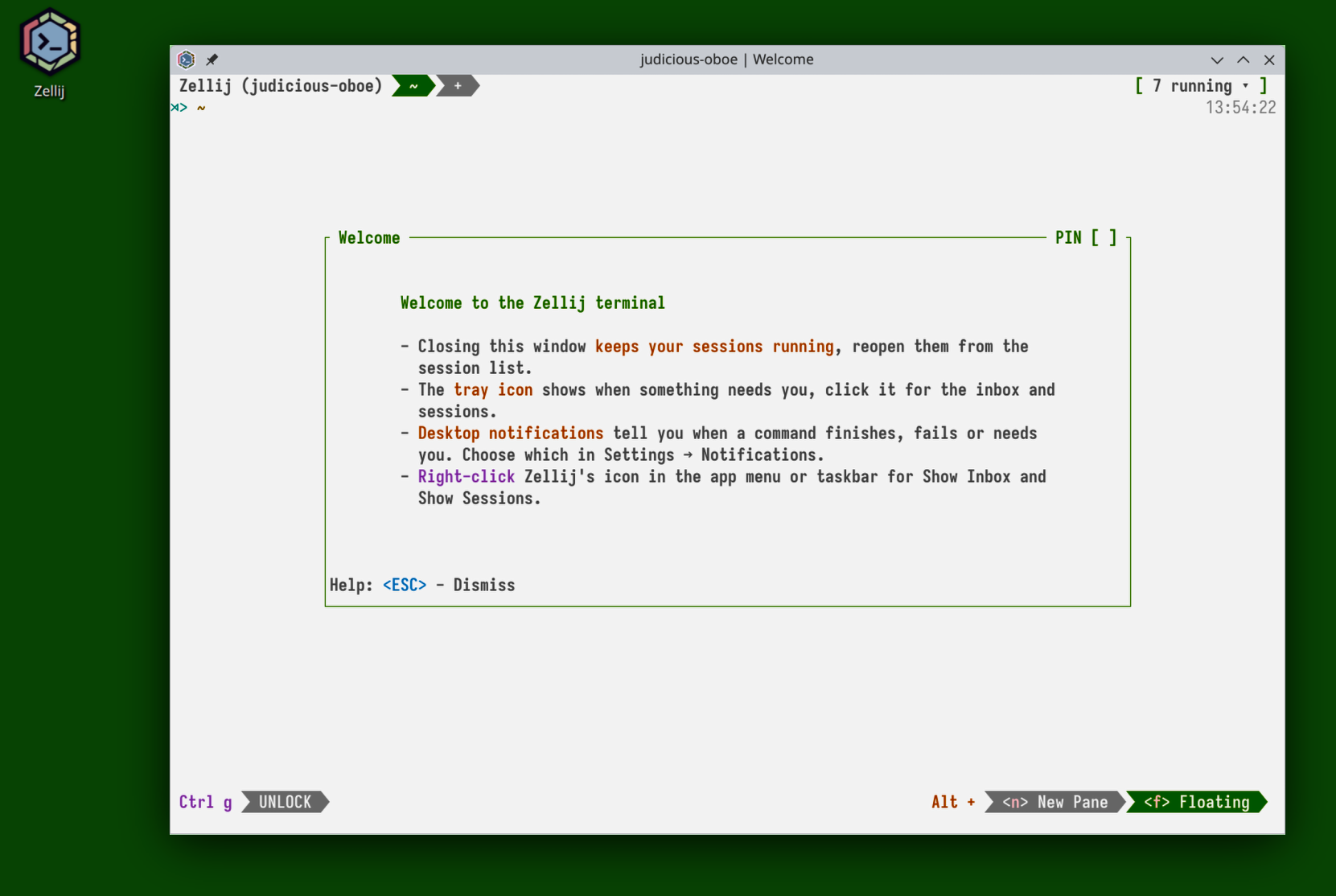
Inside your terminal, or instead of it. Zellij runs in any terminal emulator, and comes with a complete, modern terminal of its own, with image support, a tray icon and desktop notifications. The Zellij terminal →
Cross platform. Runs natively on Linux, macOS and Windows, on your computer or on a server over SSH, in a browser, even on a phone, with the web client →
Free and open source. MIT licensed, no ads, no telemetry and no account. Not funded by venture capital, but sponsored by the community →
Panes, tabs and sessions
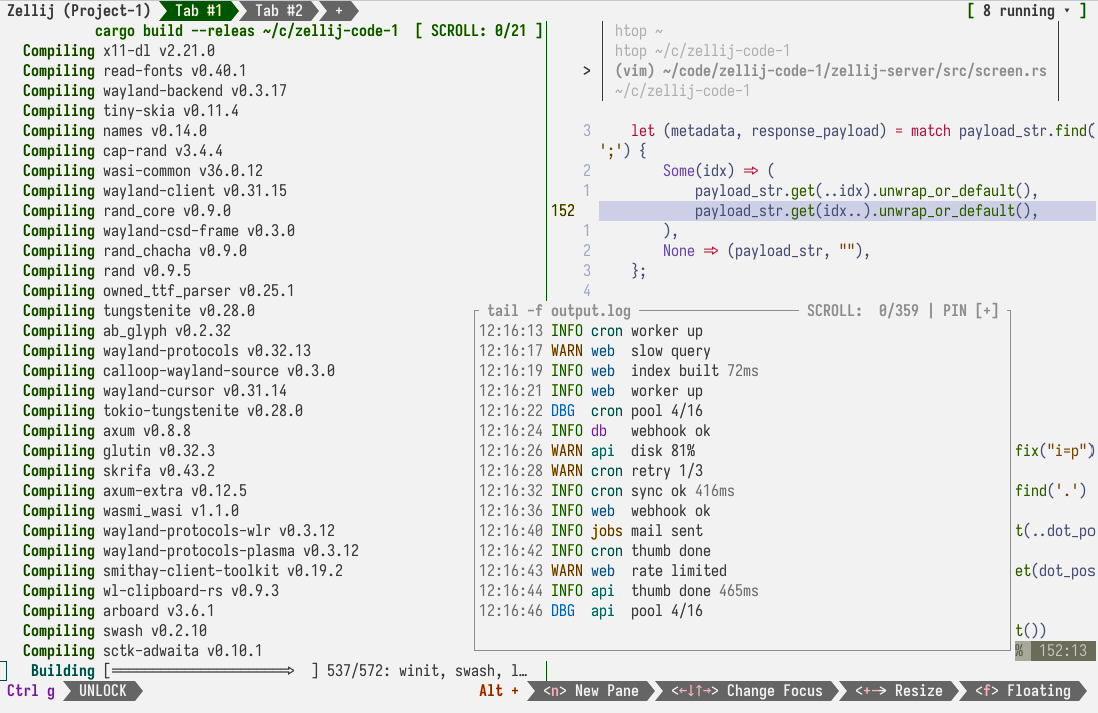
Sessions for each project. Tabs for separate tasks. Panes side by side for things you watch together. Stacks when you have more panes than room. Floating panes for a quick look or a one-off command, pinned on top if you like.
The basics →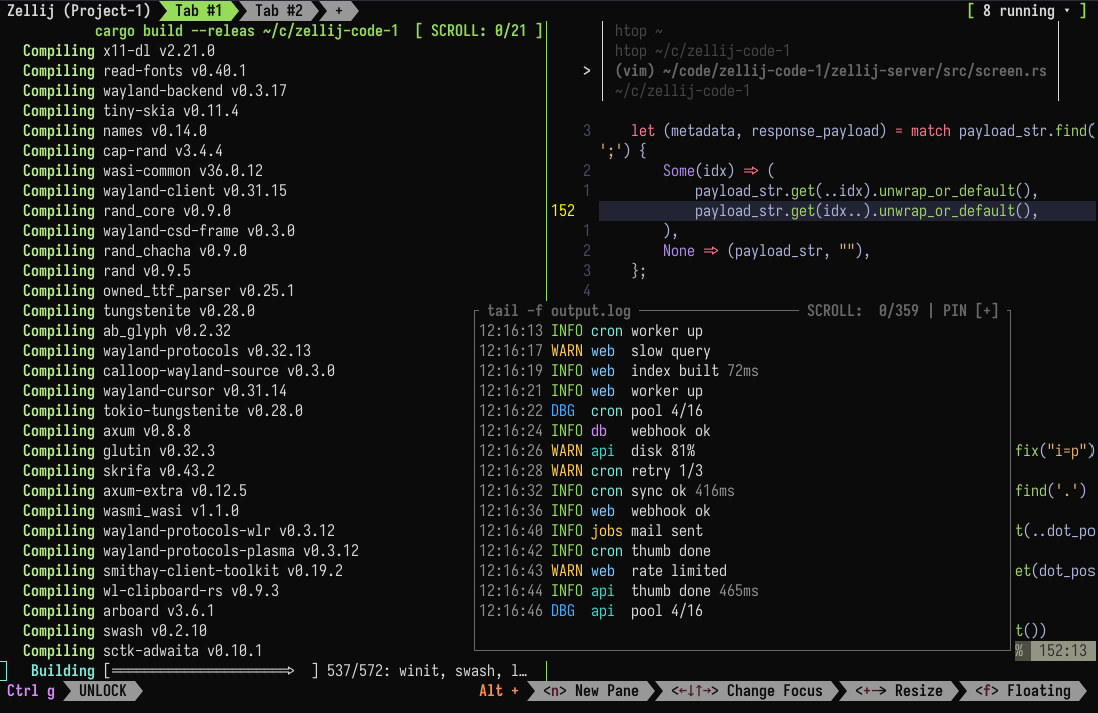
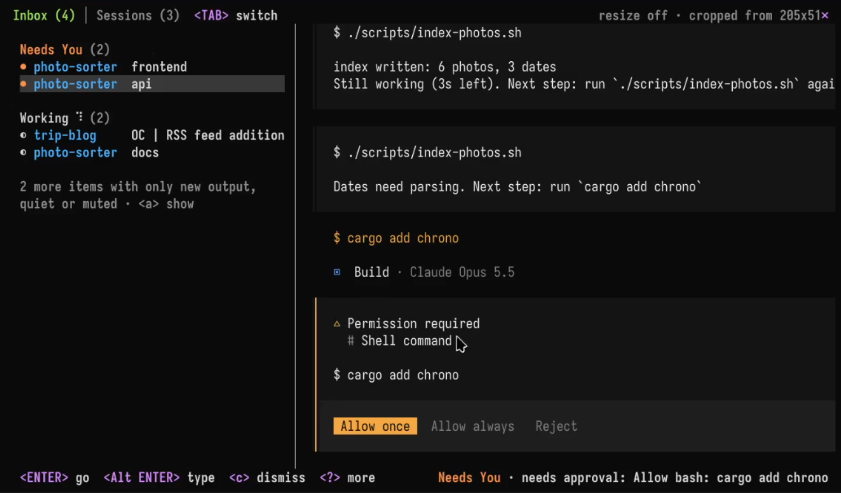
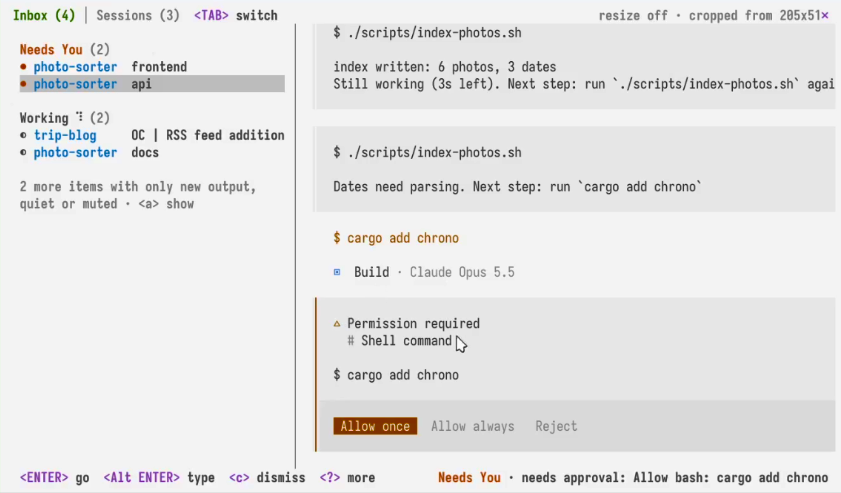
One inbox for everything that needs you
See at a glance which coding agents, builds and long-running commands are working, done, failed or waiting on you, across every session. Answer directly from the inbox or switch to jump right back in.
Zellij as your terminal
Zellij comes with its own modern terminal, complete with image support and desktop integration. Get a tray icon that shows when something needs you. Receive a desktop notification when a command finishes, fails or waits on you. Click the icon to see, open and manage your sessions, even with every window closed.
Use Zellij as your terminal →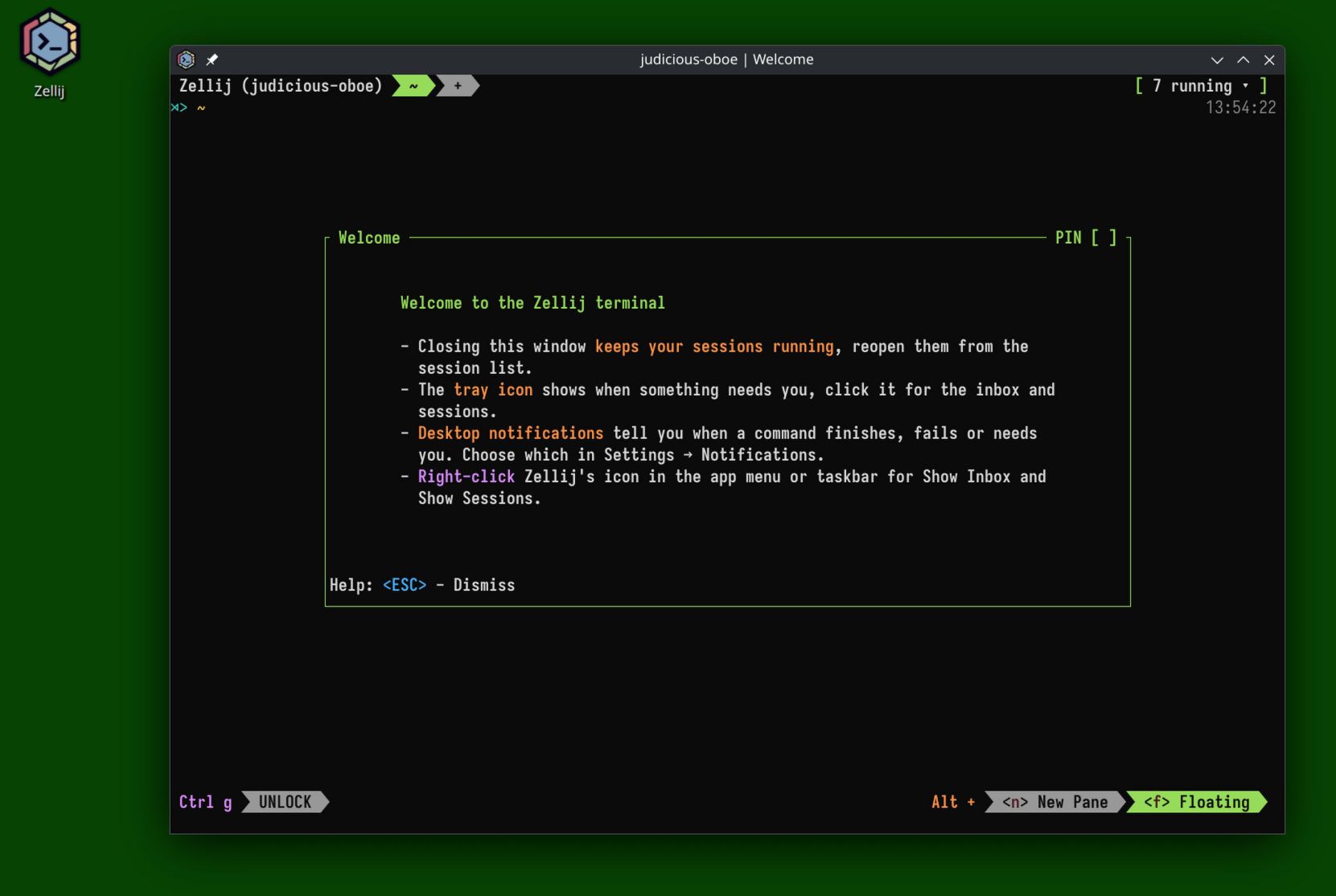
Help keep Zellij independent
Zellij is developed full-time and paid for by the people who use it, with no ads, no telemetry and no venture capital. Monthly sponsors get Zellij stickers as a thank you.
Also supported by


zellij.online
Share a terminal session with a link. People join from a browser, a terminal or a phone, end-to-end encrypted, with no certificates or port-forwarding to set up. Run by the Zellij maintainers.